
At the end of this guide, your Stream Deck shows the Overhub Live keys, paired with the collector, and you take titles, scenes and freeze from it.
Before you start
- The Elgato Stream Deck app, version 6.5 or newer, on the Windows PC that runs the collector.
- A Stream Deck: the 15-key model, the Mini or the XL.
- The collector signed in with an event selected (Sign in, pair this PC and choose an event).
INSTALL PLUGIN from the collector
-
In the collector, open Connect in the rail and find the Stream Deck row.
-
Choose INSTALL PLUGIN (or UPDATE PLUGIN when a newer plugin ships with the collector). The Stream Deck app asks you to install the Overhub plugin: confirm there.

-
The row then reads "Overhub plugin installed — keys pair automatically when you sign in."
If the row says the Stream Deck app was not detected, install the Elgato app first; the plugin offer then appears here. The collector installer can also add the plugin: Stream Deck plugin (optional).
Keys pair when you sign in
- While the collector is signed in with an event selected, the plugin pairs by itself within a few seconds. The first time, it switches your deck to the Overhub Live profile.
- The status key, top right, shows the event's name and LINKED.
- Choosing another event in the collector moves the keys to it. Signing the collector out unpairs them.
- If the keys stay greyed out, open the settings of any Overhub key in the Stream Deck app and choose Auto-detect from Collector.
The main keys
The Overhub Live profile has three rows of five keys.
-
Top row: INTERMIS puts the intermission scene on air, FREEZE freezes the live data, DIRECT switches the keys between taking straight to air and staging, and the status key shows the link.
-
Middle row: the three suggestion keys take the graphics Overhub suggests right now. SPOTLIGHT and H2H take those titles, and open a player picker when no player is chosen.
-
Bottom row: SCENES, ALL TITLES and ELEMENTS open more keys, HIDE clears what is on air, and the last key takes you back to the game after a scene.
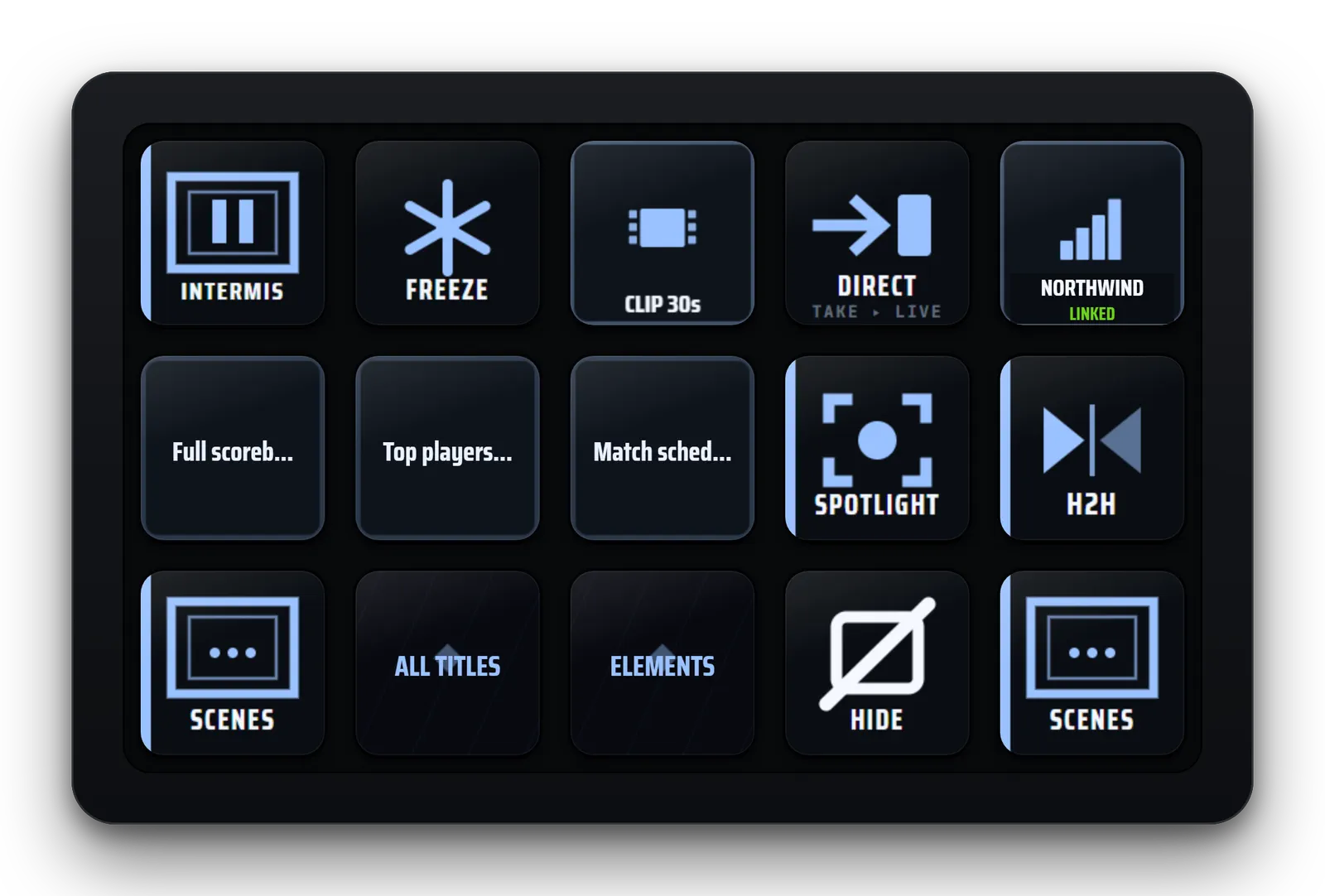
A key that is on air shows it on its face, so the deck tells you what the audience sees.